

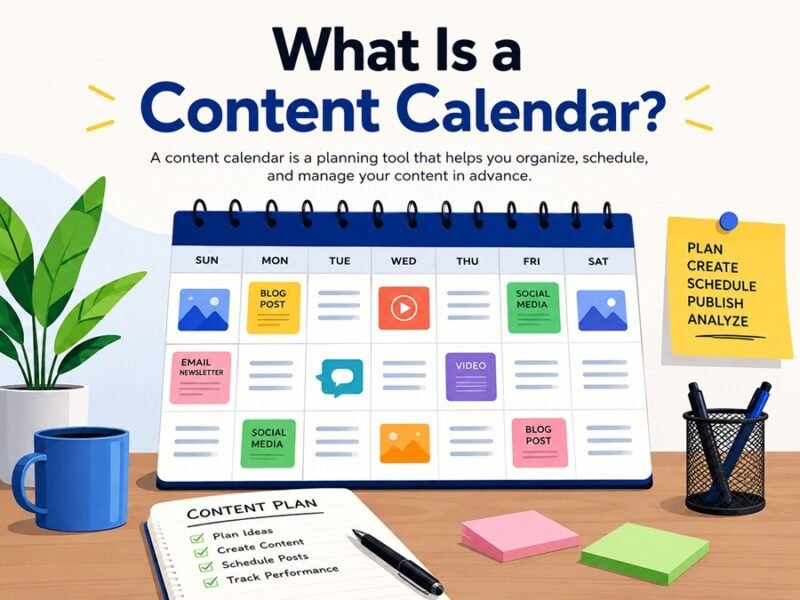
A content calendar is a planning document that maps out what content you’ll publish, where, and when. Think of it as a shared master plan — a spreadsheet, board, or app — that keeps your blog posts, social media updates, emails, and videos organized instead of scattered across sticky notes and half-remembered ideas.
If you’ve ever posted three times in one week and then gone silent for a month, this guide is for you. Below, you’ll learn exactly what a content calendar does, how to build one from scratch, and which template fits your workflow — whether you’re a solo creator or managing a five-person marketing team.
What Is a Content Calendar? (Quick Definition)
A content calendar is a schedule that organizes your content topics, publish dates, formats, and channels in one visual place.
It’s not just a to-do list. A good content calendar answers four questions at a glance:
- What are you publishing? (blog post, reel, newsletter, podcast)
- When does it go live?
- Where does it get published? (Instagram, LinkedIn, your website)
- Who owns it? (writer, designer, approver)
Some people call it an editorial calendar, a social media calendar, or a marketing calendar. The names differ slightly by use case, but the core idea stays the same: plan ahead instead of scrambling.
A small bakery uses a content calendar to line up Instagram posts around holidays — cookie photos two weeks before Diwali, a behind-the-scenes reel every Friday, and a customer review repost every Monday. Nothing is last-minute. That’s the entire point of a content calendar.
Why Do You Need a Content Calendar? (The Real Benefits)
A content calendar saves time, keeps your content consistent, and helps your team avoid duplicate or missed posts.
Here’s what changes once you start using one:
1. You stop publishing randomly
Without a plan, most creators post whenever inspiration strikes — which usually means inconsistently. Search engines and social algorithms both reward consistency. A calendar forces a rhythm.
2. You catch gaps and overlaps early
Planning a month ahead shows you if you’re ignoring an entire content pillar (say, no video content in three weeks) or duplicating a topic you already covered.
3. You align content with business goals
A calendar lets you map content to product launches, sales periods, or seasonal trends — like planning tax-related blog posts before filing season, or festive offers before Diwali.
4. Your team stops guessing
When multiple people write, design, and approve content, a shared calendar removes the “wait, who was writing this?” confusion.
5. You can measure and improve
Looking back at a calendar shows you what topics, formats, or days performed best — so future planning gets smarter, not just busier.
Quick stat-style insight: Teams that plan content at least a month in advance typically report fewer missed deadlines and more consistent posting frequency than teams that plan week-to-week. Consistency, not volume, tends to be the bigger driver of audience growth.
Types of Content Calendars
Not every calendar looks the same. Pick the type that matches what you’re actually publishing.
| Calendar Type | Best For | Typical Time Frame |
|---|---|---|
| Blog/Editorial Calendar | Website articles, guest posts, SEO content | Monthly or quarterly |
| Social Media Content Calendar | Instagram, LinkedIn, X, Facebook posts | Weekly or monthly |
| Video Content Calendar | YouTube, Reels, podcast episodes | Monthly |
| Email Marketing Calendar | Newsletters, product emails, drip campaigns | Weekly or monthly |
| Campaign Calendar | Product launches, seasonal promotions | Per-campaign |
Many teams combine two or three of these into one master calendar, then break it into channel-specific views.
Content Calendar vs. Editorial Calendar: What’s the Difference?
People often use these terms interchangeably, but there’s a subtle difference worth knowing.
| Feature | Content Calendar | Editorial Calendar |
|---|---|---|
| Scope | All content types (social, blog, video, email) | Mostly written/blog content |
| Focus | Scheduling and channel distribution | Topic planning, keyword research, editorial workflow |
| Used by | Marketing teams, social media managers | Bloggers, journalists, content editors |
| Typical detail level | Dates, platforms, status | Topics, headlines, SEO keywords, word count |
In practice, most small businesses just need one combined calendar. Larger teams sometimes run both — an editorial calendar for deep content planning, and a content calendar for day-to-day scheduling.
What Should a Content Calendar Include?
A functional content calendar needs at least seven core elements to actually be useful, not just decorative.
Here’s the checklist:
- ✅ Publish date — the exact day (and time, for social media)
- ✅ Content title/topic — what the piece is about
- ✅ Content type/format — blog, carousel, reel, email, infographic
- ✅ Platform/channel — website, Instagram, LinkedIn, YouTube
- ✅ Status — idea, drafting, in review, scheduled, published
- ✅ Owner — who’s responsible for writing, designing, or posting
- ✅ Target keyword or goal — for SEO content, the primary keyword; for social, the campaign goal
- ✅ Notes/links — draft links, image assets, approval comments
Optional but useful additions: content pillar/category, CTA (call-to-action), performance metrics (clicks, likes, shares) after publishing.
How to Create a Content Calendar: Step-by-Step
Building a content calendar takes five steps: audit your goals, choose a format, pick your content pillars, plug in dates, and review weekly.
Step 1: Define your content goals
Before adding a single date, decide what you’re trying to achieve — brand awareness, website traffic, leads, or community engagement. Your goal shapes what content you plan.
Step 2: Choose your tool
You don’t need fancy software to start. A Google Sheet, Notion board, or Trello board works fine for beginners. (More on tool options below.)
Step 3: Pick your content pillars
Content pillars are the 3–5 core topics you’ll consistently cover. For example, a fitness brand might use: workout tips, nutrition, client transformations, and motivation.
Step 4: Set your publishing frequency
Decide realistically how often you can publish per platform. It’s better to post twice a week consistently than daily for two weeks and then vanish.
Step 5: Fill in dates and assign owners
Add specific dates, assign each piece to a team member (or yourself), and mark the status. Leave buffer days for editing and approvals.
Step 6: Review and adjust weekly
A content calendar isn’t static. Check it weekly, move things around based on trends or news, and log what’s performing well.
Free Content Calendar Template (Copy This Structure)
Here’s a simple, beginner-friendly layout you can recreate in Google Sheets, Excel, or Notion in under five minutes.
| Date | Content Title | Format | Platform | Keyword/Goal | Owner | Status |
|---|---|---|---|---|---|---|
| July 10 | 5 Morning Habits for Productivity | Blog post | Website | “morning productivity habits” | Riya | Drafting |
| July 12 | Behind-the-scenes reel | Reel | Brand engagement | Aman | Scheduled | |
| July 14 | Weekly newsletter | Mailchimp | Retention | Riya | Idea | |
| July 16 | Client success story | Carousel | Lead gen | Priya | In review | |
| July 18 | How to Use a Content Calendar | Blog post | Website | “content calendar template” | Riya | Published |
Pro tip: Color-code the “Status” column (red for overdue, yellow for in progress, green for published). It gives you an instant visual health-check of your pipeline.
Social Media Content Calendar: What’s Different
A social media content calendar focuses on platform-specific timing, formats, and posting frequency — details a general content calendar doesn’t need to track.
Social platforms move faster than blogs, so your calendar needs extra columns: caption, hashtags, and posting time (since engagement varies by hour).
Suggested posting frequency by platform
| Platform | Suggested Frequency (Beginners) | Best Content Types |
|---|---|---|
| 3–5 posts/week + daily Stories | Reels, carousels, Stories | |
| 2–4 posts/week | Text posts, carousels, articles | |
| 3–5 posts/week | Images, links, short video | |
| X (Twitter) | 1–3 posts/day | Threads, quick updates |
| YouTube | 1–2 videos/week | Long-form, Shorts |
These are starting points, not rules. Frequency should match what your team can sustain with good quality — three excellent posts beat seven rushed ones.
What to add to a social-specific calendar
- Caption draft
- Hashtags/tags
- Best posting time (based on your audience’s activity)
- Visual asset link (image/video file)
- Campaign tag (if the post belongs to a bigger campaign)
Content Calendar Examples (By Use Case)
Seeing real scenarios makes this easier to apply. Here are three quick examples.
Example 1: Solo blogger
A personal finance blogger plans one blog post per week, tied to a monthly theme (e.g., “Budgeting Month,” “Investing Basics Month”). Her calendar has just four columns: date, topic, keyword, status.
Example 2: Small business (bakery)
The bakery runs a monthly Instagram calendar aligned with festivals and weekly specials. Their calendar includes caption drafts and photo shoot dates, since visuals take longer to prepare than text.
Example 3: Marketing team (SaaS company)
A five-person team runs a shared Notion calendar covering blog posts, LinkedIn thought-leadership posts, and a bi-weekly newsletter — all tagged to a quarterly product launch campaign, with owners and review deadlines for each item.
Best Content Calendar Tools (Free and Paid)
You can build a content calendar in a spreadsheet for free, or use dedicated tools like Trello, Notion, Asana, or Buffer for more automation.
| Tool | Best For | Free Plan? | Notable Feature |
|---|---|---|---|
| Google Sheets | Beginners, solo creators | Yes | Fully customizable, zero learning curve |
| Notion | Small teams, flexible workflows | Yes (limited) | Drag-and-drop boards + calendar view |
| Trello | Visual task-based planning | Yes (limited) | Kanban-style cards for each content piece |
| Asana | Teams needing task dependencies | Yes (limited) | Timeline view, approvals, reminders |
| Buffer/Hootsuite | Social media scheduling + calendar | Free trial | Auto-publishing to social platforms |
| CoSchedule | Marketing teams wanting all-in-one planning | Paid only | Combines calendar + marketing suite |
Which one should you pick?
- Just starting out → Google Sheets or Notion
- Managing a small team → Trello or Asana
- Running multiple social accounts → Buffer or Hootsuite
- Running full marketing campaigns → CoSchedule
Content Calendar Best Practices (Checklist)
Use this checklist before you consider your calendar “done” for the month:
- ☐ Every entry has a clear publish date
- ☐ Content pillars are balanced (not all one topic)
- ☐ Each platform has realistic, sustainable frequency
- ☐ Owners are assigned for writing, design, and approval
- ☐ Seasonal/trending dates are marked (festivals, product launches)
- ☐ Buffer time exists between drafting and publishing
- ☐ A weekly review slot is scheduled
- ☐ Past performance data informs new topics
Common Content Calendar Mistakes to Avoid
Most content calendars fail not because of bad tools, but because of unrealistic planning and no review habit.
- Overplanning volume, underplanning quality — Five posts a week sounds great until none of them perform well.
- No buffer time — Scheduling content the same day it’s due to publish leaves zero room for edits or emergencies.
- Ignoring analytics — A calendar without a feedback loop just repeats what isn’t working.
- One person doing everything — Even solo creators benefit from a simple review step (read it again the next day before publishing).
- Too rigid a structure — Leave room for timely, trend-based content that wasn’t planned a month ago.
Conclusion: Your Next Steps
A content calendar isn’t about looking organized — it’s about publishing consistently, hitting the right audience at the right time, and reducing the daily stress of “what do I post today?”
Here’s how to start today, in under 30 minutes:
- Open a blank Google Sheet or Notion page.
- Copy the seven-column template from this guide.
- Add your content pillars and next two weeks of ideas.
- Assign one weekly slot to review and adjust.
Start small. A two-week calendar with five solid entries beats an empty 12-month plan every time. Once the habit sticks, expanding to a full quarterly calendar becomes much easier.
6. FAQs
1. What is a content calendar in simple words?
A content calendar is a schedule that shows what content you’ll publish, on which platform, and on what date — so you plan ahead instead of posting randomly.
2. Is a content calendar the same as a social media calendar?
Not exactly. A content calendar can cover all content types (blogs, emails, videos), while a social media calendar focuses only on social platforms like Instagram or LinkedIn.
3. What should I include in a content calendar?
At minimum: publish date, content title, format, platform, status, and owner. Add keyword/goal and notes for more detail.
4. How far in advance should I plan my content calendar?
Beginners should start with two to four weeks. Established teams often plan a full month or quarter ahead, while leaving room for timely, trend-based posts.
5. What’s the best free content calendar template?
Google Sheets and Notion both offer free, customizable templates. A simple seven-column layout (date, title, format, platform, keyword, owner, status) works for most beginners.
6. How often should I post on social media using a content calendar?
It depends on the platform. As a starting point: Instagram 3–5 times a week, LinkedIn 2–4 times a week, and YouTube 1–2 times a week. Consistency matters more than raw frequency.
7. Can a content calendar help with SEO?
Yes. Planning blog topics around target keywords, search intent, and publishing consistency all support better search rankings over time.
8. What tools are best for managing a content calendar?
Google Sheets and Notion are great for beginners. Trello and Asana suit small teams. Buffer and Hootsuite work well if you need auto-scheduling for social media.
9. Do solo creators really need a content calendar?
Yes — even more so. Without a team to remind you, a calendar is what keeps a solo creator’s posting schedule consistent.
10. How do I fix a content calendar that keeps falling behind?
Reduce your planned frequency, add buffer days between drafting and publishing, and schedule a fixed weekly review slot to catch delays early.
